
DKubeX Documentation DKubeX Documentation DKubeX Documentation
/
  • v2.0.0
  • v2.0.0.1
  • v2.0.0.2

Contents

  • DKubeX 2.0
  • Installing DKubeX 2.0
  • Quickstart
  • Tutorials
    • Deploying Models on DKubeX Using Model Studio
    • Test and Deploy a Guardrail Policy in SecureLLM
    • Creating and Using API Keys in SecureLLM
    • Configuring and Enabling AI Providers in SecureLLM
  • Applications
    • AgentX
      • AgentX Overview
      • Getting Started with AgentX
      • User Guide
    • Langflow on DKubeX
      • Getting Started
      • Building Flows
      • Components
      • Deploying Flows
    • LexPilot
      • Features
    • ModelStudio
      • Getting Started with ModelStudio
      • Deploying Models
      • Playground Guide
    • MortIQ
      • Getting Started with MortIQ
    • RAGFlow
      • Quickstart
      • Search
      • Files
      • What is Retrieval-Augmented-Generation (RAG)?
      • What is Agent context engine?
      • Configure model API key
      • Start AI chat
      • Implement deep research
      • Set variables
      • Configure dataset
      • Run retrieval test
      • Use tag set
      • Enable Excel2HTML
      • Set page rank
      • Set metadata
      • Manage metadata
      • Configure child chunking strategy
      • Set context window size
      • Select PDF parser
      • Construct knowledge graph
      • Enable RAPTOR
      • Extract table of contents
      • Auto-extract metadata
      • Add Google Drive as data source
      • Introduction
      • Embed Agent into webpage
      • Accelerate answering
      • Build Ecommerce customer support agent
      • Ingestion pipeline quickstart
      • Sandbox quickstart
      • Begin component
      • Title chunker component
      • Token chunker component
      • Docs Generator component
      • Execute SQL tool
      • HTTP request component
      • Indexer component
      • Message component
      • Parser component
      • Transformer component
      • Configuration
      • Backup & migration
      • Admin Service
      • Admin UI
      • RAGFlow CLI
      • Use memory
      • Manage team members
      • Join or leave a team
      • Share dataset
      • Share chat assistant
      • Share Agent
      • Share models
      • Share memory
    • SecureLLM
    • Dkubex Workspace User Guide

On this page

  • Prerequisites
  • Frequently asked questions
    • Key difference between an AI search and an AI chat?
  1. DKubeX Documentation /
  2. Applications /
  3. Quickstart /
  4. Search
View as Markdown Open in ChatGPT Open in Claude

Search

Conduct an AI search.


An AI search is a single-turn AI conversation using a predefined retrieval strategy (a hybrid search of weighted keyword similarity and weighted vector similarity) and the system’s default chat model. It does not involve advanced RAG strategies like knowledge graph, auto-keyword, or auto-question. The related chunks are listed below the chat model’s response in descending order based on their similarity scores.

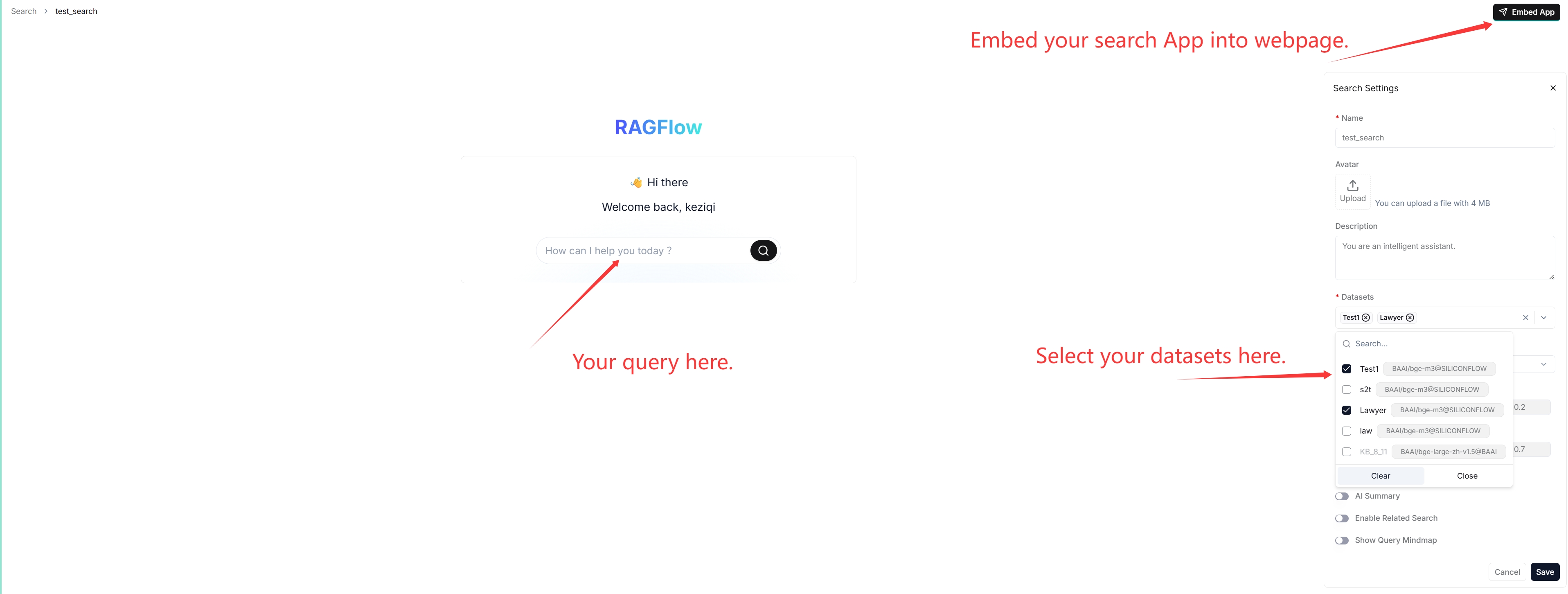
Create search app

Search view

:::tip NOTE When debugging your chat assistant, you can use AI search as a reference to verify your model settings and retrieval strategy. :::

Prerequisites

  • Ensure that you have configured the system’s default models on the Model providers page.

  • Ensure that the intended datasets are properly configured and the intended documents have finished file parsing.

Frequently asked questions

Key difference between an AI search and an AI chat?

A chat is a multi-turn AI conversation where you can define your retrieval strategy (a weighted reranking score can be used to replace the weighted vector similarity in a hybrid search) and choose your chat model. In an AI chat, you can configure advanced RAG strategies, such as knowledge graphs, auto-keyword, and auto-question, for your specific case. Retrieved chunks are not displayed along with the answer.

Previous
Quickstart
Next
Files

© 2026, dkube.io. All rights reserved. Last updated on: 26.05.2026. Documentation version: v2.0.0.2

Made with Sphinx and Shibuya theme.