
Deploying Models#
ModelStudio supports three deployment paths:
LLM models — deployed as KubeAI
ModelCRDs, sourced from HuggingFace HubML models — deployed as KServe
InferenceServiceCRDs, sourced from MLflow or HuggingFace HubNVIDIA NIM models — registered from the NVIDIA NGC catalog and deployed in-cluster on GPU nodes via the k8s-nim-operator
LLM Models (KubeAI)#
Discovering LLM Models#
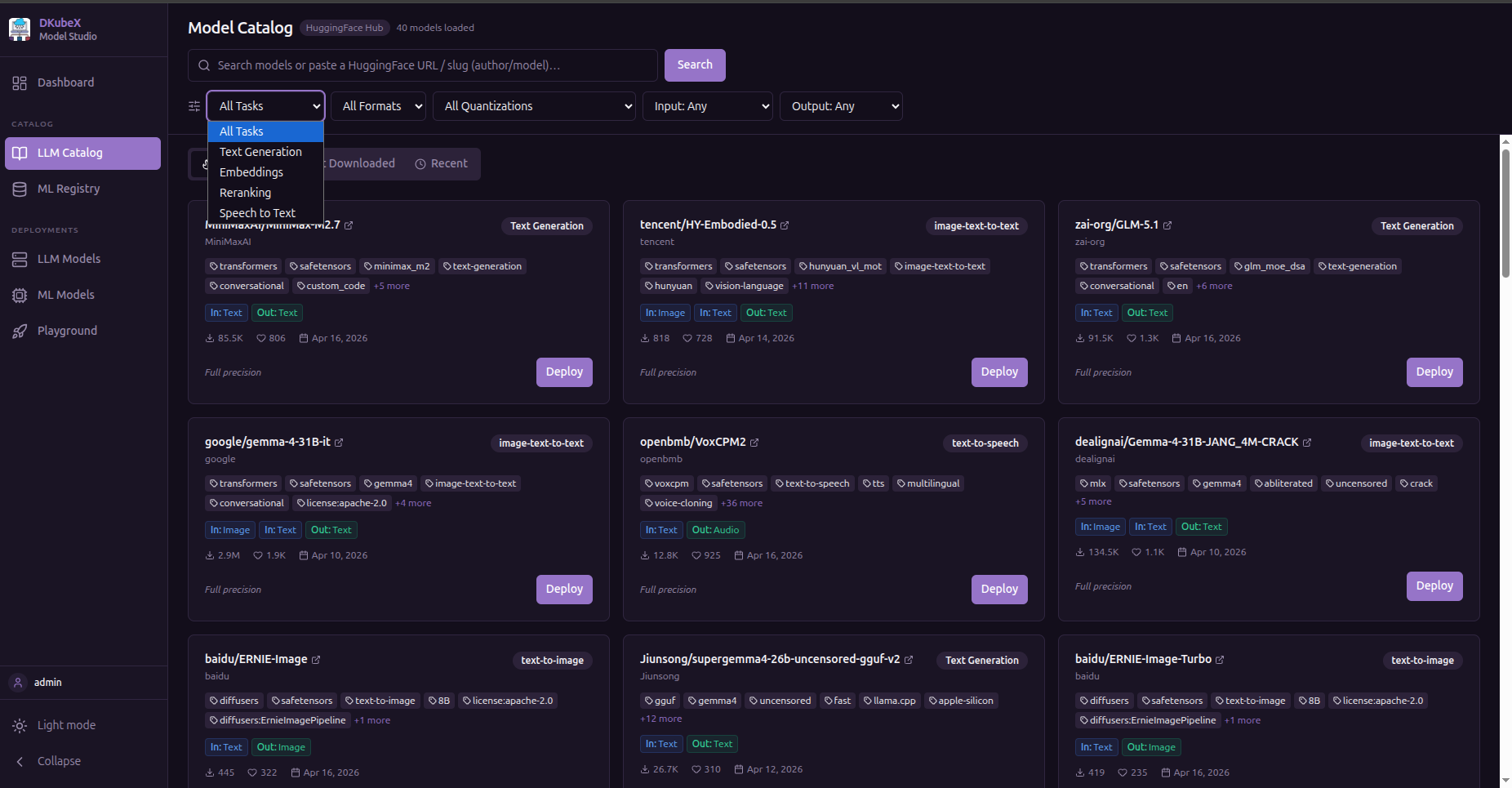
Use the LLM Catalog page to search HuggingFace. Models are shown across four tabs:
Trending — models gaining momentum
Most Downloaded — sorted by all-time download count
Recent — newest additions
Search Results — results for your query or HuggingFace URL/slug
You can filter by:
Filter |
Options |
|---|---|
Task |
Text Generation, Embeddings, Reranking, Text to Speech (Speech Recognition and Image Generation — coming in future KubeAI releases) |
Precision |
GGUF (quantized), Safetensors, PyTorch |
Quantization |
Q4_K_M, Q4_0, Q5_K_M, Q6_K, Q8_0, FP16, BF16 |
Input modality |
Text, Image, Audio, Video, File |
Output modality |
Text, Image, Audio, Embeddings, Video |
The LLM Deploy Form#
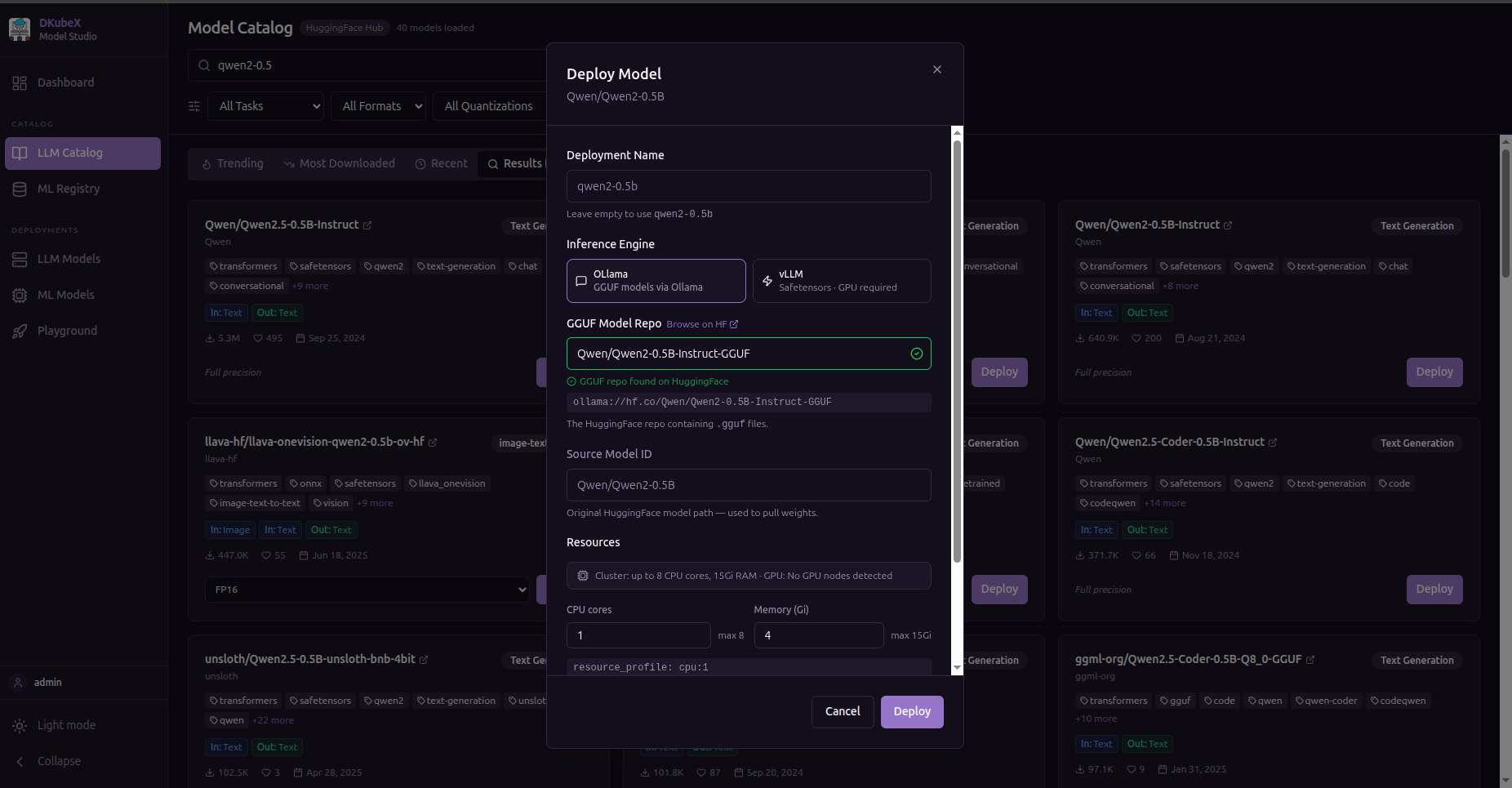
Clicking Deploy on a model card opens the deploy modal.
Fields#
Field |
Description |
Example |
|---|---|---|
Model |
Pre-filled from the LLM Catalog card |
|
Quantization |
Weight precision level; lower = smaller, faster, slightly less accurate |
|
Engine |
Inference runtime (auto-selected based on model type) |
|
Features |
Inference capabilities to enable |
|
Resource Profile |
CPU/GPU/memory allocation preset |
|
Replicas |
Number of serving pods |
|
Scope |
|
|
Supported features in the current KubeAI release:
TextGeneration,TextEmbedding,Reranking,TextToSpeech. Support forSpeechToText,ImageText(Vision), andImageGenerationis planned for future KubeAI releases.
Resource Profiles#
Resource profiles are cluster-defined presets. The list is fetched dynamically from /api/resource-profiles based on the nodes available in your cluster. Contact your cluster admin to add custom profiles.
LLM Deployment Lifecycle#
After you click Deploy, the KubeAI Model CRD is created. KubeAI reconciles the resource:
Pending → Downloading → Starting → Running
Status |
Meaning |
|---|---|
|
CRD created, pods not yet scheduled |
|
Model weights being pulled from HuggingFace |
|
Pods scheduled, inference server initializing |
|
Model ready to serve requests |
|
Pod could not start — check cluster logs |
Monitor progress in the Dashboard model table or the LLM Models page.
Managing Deployed LLM Models#
All your LLM deployments are visible on the LLM Models page.
Edit a Model#
Click the Edit (pencil) icon to update:
Resource profile
Replica count
The update is applied via a PATCH /api/models/{id} call and takes effect immediately.
Delete a Model#
Click the Delete (trash) icon. The KubeAI CRD is removed and all pods are terminated. This action cannot be undone.
Promote / Demote Scope#
Use the scope toggle button to move a model between Private and Shared:
Promote to Shared — the model becomes visible and usable by all workspace users
Demote to Private — the model is restricted back to your account
Note: promoting renames the CRD from
{username}--{model-id}toshared--{model-id}.
Open in Playground#
Click the Playground icon on any running model to jump directly to the inference workbench with that model pre-selected.
LLM CRD Naming Convention#
Scope |
CRD Name Pattern |
Example |
|---|---|---|
Private |
|
|
Shared |
|
|
Model IDs are sanitized to be Kubernetes-safe (lowercase alphanumeric and -, max 63 characters). Colons, slashes, underscores, and dots in the original HuggingFace model ID are converted to -.
ML Models (KServe)#
ML model deployment requires KServe to be enabled in the platform. The ML Registry and ML Models pages are hidden when KServe is not available.
Discovering ML Models#
Use the ML Registry page. It has two tabs:
MLflow — lists registered models from your connected MLflow model registry. Each model shows its registered versions and lifecycle stages (
None,Staging,Production,Archived). Requires MLflow to be configured in the platform. All MLflow model formats (sklearn, XGBoost, LightGBM, TensorFlow, PyTorch, ONNX, MLflow pyfunc, HuggingFace) are deployable.HuggingFace ML — HuggingFace models filtered to ML-oriented task types. Only text-based pipeline tasks are currently supported by
kserve-huggingfaceserver. Models with vision, audio, tabular, or multimodal pipeline tags show a Coming Soon badge and cannot be deployed yet.Supported HuggingFace ML pipeline tasks:
text-generation,text2text-generation,text-classification,token-classification,fill-mask,question-answering,summarization,translation,feature-extractionComing Soon (not yet deployable):
image-classification,object-detection,tabular-classification,tabular-regression,image-segmentation,audio-classification, and other vision/audio/multimodal tasks
Click Deploy on any supported model card to open the ML deploy form.
The ML Deploy Form#
Fields#
Field |
Description |
Example |
|---|---|---|
Model Name |
Auto-filled from MLflow model name or HuggingFace model ID |
|
Model Format |
Framework used to train the model |
|
Source |
Where the model artifact lives |
|
Min Replicas |
Minimum number of serving pods |
|
Max Replicas |
Maximum pods for autoscaling |
|
CPU Request / Limit |
Pod CPU allocation |
|
Memory Request / Limit |
Pod memory allocation |
|
GPU |
Optional GPU resource key and count |
|
ModelStudio automatically resolves the correct KServe runtime based on the model format:
Format |
KServe Runtime |
Notes |
|---|---|---|
|
kserve-sklearnserver |
|
|
kserve-xgbserver |
|
|
kserve-lgbserver |
|
|
kserve-tensorflow-serving |
|
|
kserve-torchserve |
|
|
kserve-tritonserver |
|
|
kserve-mlserver (pyfunc) |
Auto-detects framework flavor from MLmodel file |
|
kserve-huggingfaceserver |
Text-based pipeline tasks only; vision/audio/multimodal coming soon |
For MLflow-sourced models, leaving the format as mlflow enables auto-detection: the backend reads the MLmodel artifact file and selects the purpose-built runtime (e.g. kserve-sklearnserver for sklearn flavors) instead of the generic mlserver.
HuggingFace ML models are limited to text-based pipeline tasks by the current
kserve-huggingfaceserverruntime. Attempting to deploy a vision, audio, or multimodal HuggingFace model is blocked in the UI with a Coming Soon indicator.
ML Deployment Lifecycle#
After clicking Deploy, a KServe InferenceService CRD is created:
Pending → Running
         → Failed
Status |
Meaning |
|---|---|
|
InferenceService created, model not yet loaded |
|
Model loaded and ready to serve requests |
|
Pod could not start or model failed to load |
Monitor progress in the ML Models table.
Managing Deployed ML Models#
All your KServe deployments are visible on the ML Models page.
You can filter by format, source, status, and owner.
Delete a Model#
Click the Delete icon. The KServe InferenceService CRD is removed. You can only delete models you own.
Shared ML models are visible to all workspace users but can only be deleted by the model owner.
KServe InferenceService Naming#
Scope |
Name Pattern |
Example |
|---|---|---|
Private |
|
|
Shared |
|
|
Model names are truncated and sanitized to fit Kubernetes naming constraints. The 8-character user hash ensures uniqueness when multiple users deploy the same model name.
NVIDIA NIM Models#
NIM requires the NIM feature to be enabled in the platform. The NIM tab in Catalog and NGC API Keys in Settings are hidden when NIM is not available.
Prerequisites#
An NGC Personal API Key — add it in Settings → NGC API Keys
GPU-enabled nodes and the k8s-nim-operator installed by your cluster admin. Contact your admin to confirm availability.
Discovering NIM Models#
Go to the Catalog page and select the NIM tab. The NIM catalog shows models available from NVIDIA NGC, organized by category:
Category |
Examples |
|---|---|
LLM |
LLaMA 3.1, Mistral, Gemma, Phi |
Embedding |
NV-Embed, E5-Mistral |
Reranking |
NV-RerankQA |
Vision-Language |
VILA, PaliGemma |
Speech |
Parakeet ASR |
Use the search bar to find a specific model by name.
Registering a NIM Model#
Click Register on any NIM catalog card to open the registration form.
Fields#
Field |
Description |
Default |
|---|---|---|
Display Name |
Human-readable name shown in Playground and model lists |
model id basename |
GPU Count |
Number of GPUs per replica |
|
Replicas |
Number of serving instances |
|
Inference Engine (advanced) |
|
|
NIM inference runs on your cluster’s GPU nodes. The NGC API Key saved in Settings is used for both NGC catalog metadata and the in-cluster image-pull secret. Click Register to create the registration.
NIM Deployment Lifecycle#
After registering a NIM model, the deployment goes through several phases:
Pending → Deploying (cache) → Deploying (service) → Running
Status |
Meaning |
Typical Duration |
|---|---|---|
|
Registration created, deployment initializing |
Seconds |
|
Model weights being downloaded to cluster storage |
10–25 min for LLM models |
|
Inference container starting, TRT engines compiling |
2–5 min on first start |
|
Ready to serve inference requests |
— |
The Playground shows a status banner and disables inference for NIM models that are not yet Running.
First-time deployment: TRT engine compilation happens on the first start and takes 2–5 minutes. Subsequent restarts on the same node are faster because compiled engines are cached.
Managing Registered NIM Models#
All registered NIM models are shown in the NIM Models section of the Dashboard and on the LLM Models page.
Available Actions#
Action |
Description |
|---|---|
View status |
Live status with ready replica count |
Scale replicas |
Change replica count up or down (set to 0 to release GPU) |
Restart pods |
Rolling restart of inference pods |
View logs |
Tail the last N lines from the container |
View events |
Recent events from the deployment |
Unregister |
Removes registration and all cluster resources |
Unregister: Unregistering removes the inference deployment and cached model weights from the cluster. This action cannot be undone.
NIM Model Availability#
Registered NIM models are visible to all authenticated workspace users, but inference is only available once the deployment reaches Running status.
There is no private/shared scope toggle for NIM models — all registered NIM models are workspace-wide.